
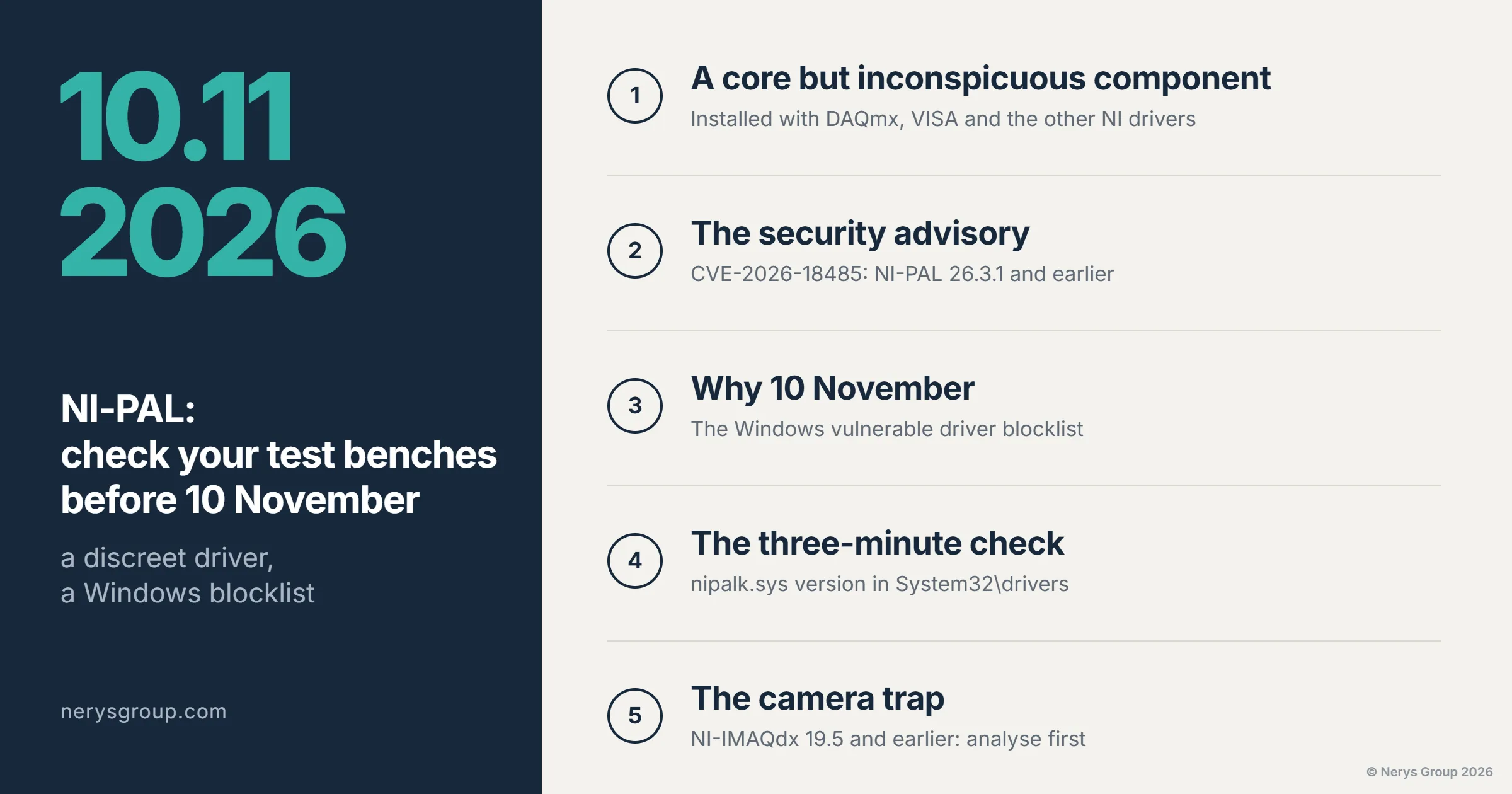
A core component of the NI drivers, a security fix, and a date from which Windows may decide not to load it any more. The subject is dry, the check takes three minutes, and it is worth doing on every test bench running on NI Emerson (formerly National Instruments) hardware.
There is one kind of failure we really dislike: the one that turns up on a Monday morning on a test bench nobody has touched. Same software, same hardware, and yet the acquisition boards no longer appear in NI MAX. The cause almost always lies below the application, in the stack of drivers and services the bench depends on without anyone giving them a thought. The next opportunity of this kind has a date: 10 November 2026. NI Emerson has released a security fix for NI-PAL, a low-level component present on most PCs with NI drivers installed, and Microsoft has added the older versions of this component to its vulnerable driver list, the one Windows can refuse to load. Our colleagues at Mesulog published an information note on 22 October that goes through NI's instructions point by point; here, we look at what it actually changes for a test bench. This article explains what NI-PAL is, what the security advisory says, why the date matters, how to check a bench in three minutes, and where the pitfalls are.
A core component, but an inconspicuous one
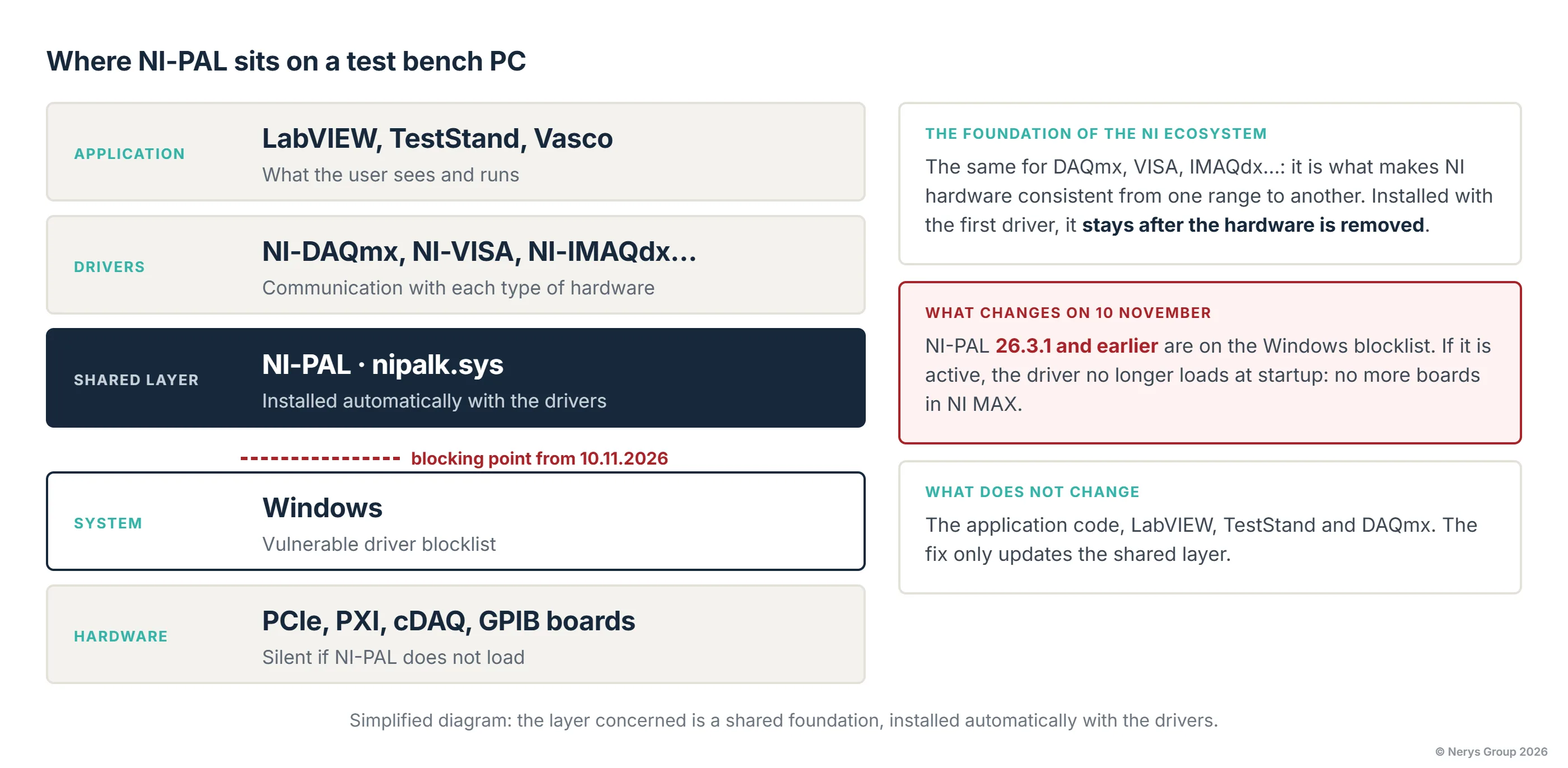
NI-PAL, short for Platform Abstraction Layer, is the common foundation of the NI Emerson drivers. It is what gives NI-DAQmx, NI-VISA, NI-IMAQdx and the others low-level access to the hardware and system resources, in the same way whatever the Windows version. It is also what makes the NI ecosystem strong: a PCIe board, a PXI chassis, a cDAQ and a GPIB instrument can all be controlled from the same application, with the same behaviour, because they rest on the same foundation. On a typical test bench, the stack looks like this: the LabVIEW or TestStand application runs the test, NI-DAQmx talks to the board, NI-PAL provides it with the system services it needs, and Windows arbitrates the whole thing. Users see the first layer, sometimes the second; the third is installed automatically with the drivers, and that is how it should be: a good foundation goes unnoticed as long as it works.
That is what makes the issue broader than it seems. A PC that once had an NI PCI board, a GPIB interface or just NI-VISA to control a multimeter has NI-PAL installed, and keeps it after the hardware has been removed. You do not need to develop in LabVIEW to be affected; installing an NI driver is enough. Note: our own software is in the same situation. Every Vasco installation includes a Windows PC, even when acquisition runs on a real-time target, and that PC carries NI drivers: it depends on NI-PAL exactly as an in-house LabVIEW application does. The criterion is not the name of the application, but the version of the installed component.
What the security advisory says
NI has published an advisory for vulnerability CVE-2026-18485, which affects NI-PAL 26.3.1 and all earlier versions on Windows. It is a local privilege escalation: a user already logged on to the machine can obtain system rights they should not have. So it is not an open door from the Internet, and on a bench isolated from the network with two operator accounts, the pure security risk should be kept in perspective.
A word of caution, though: keeping it in perspective does not mean ignoring it. A test bench with access to the company network, or one that subcontractors log on to, is exactly the kind of PC where a local privilege escalation becomes a problem for someone other than the bench. Above all, the reason to deal with it now is not security. It is availability.
Why 10 November
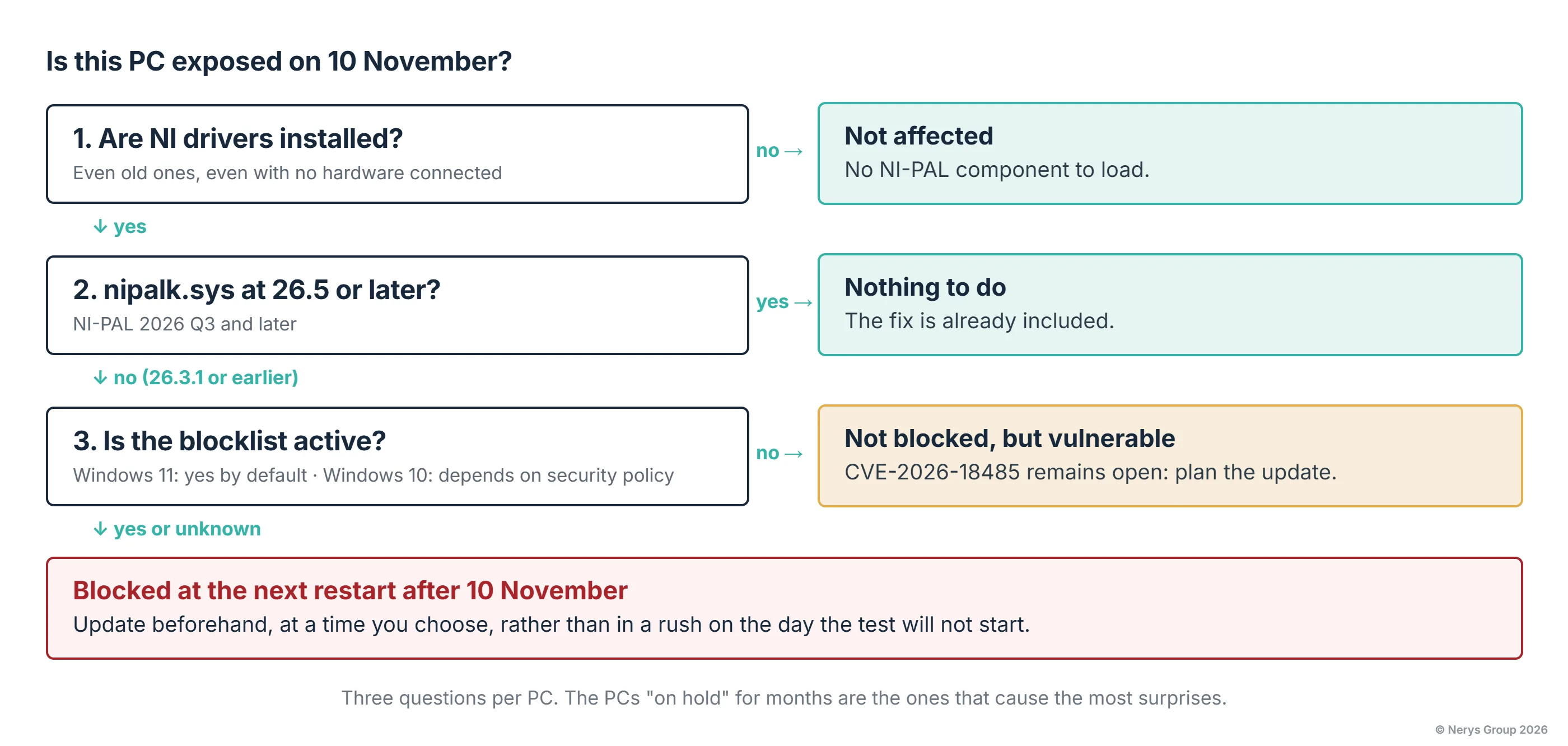
Windows keeps a list of drivers considered vulnerable, and can block them from loading at startup. The affected versions of NI-PAL are now on it, with an announced effective date of 10 November 2026. On Windows 11, this protection is enabled by default. On Windows 10, it generally is not, unless the company's security policy has enabled it, which is increasingly common.
In practice, a bench whose NI-PAL is blocked at startup no longer recognises its boards in NI MAX, the application reports communication errors, and today's test does not happen. Nothing breaks, but nothing works. It is important to be precise about what this means: 10 November is not the date on which every test bench will stop. It is the date from which, on a system where the blocklist is active, the risk becomes real. So the question is not "are we affected?" but "which of our PCs are, and which will get through the date without noticing anything?".
The three-minute check
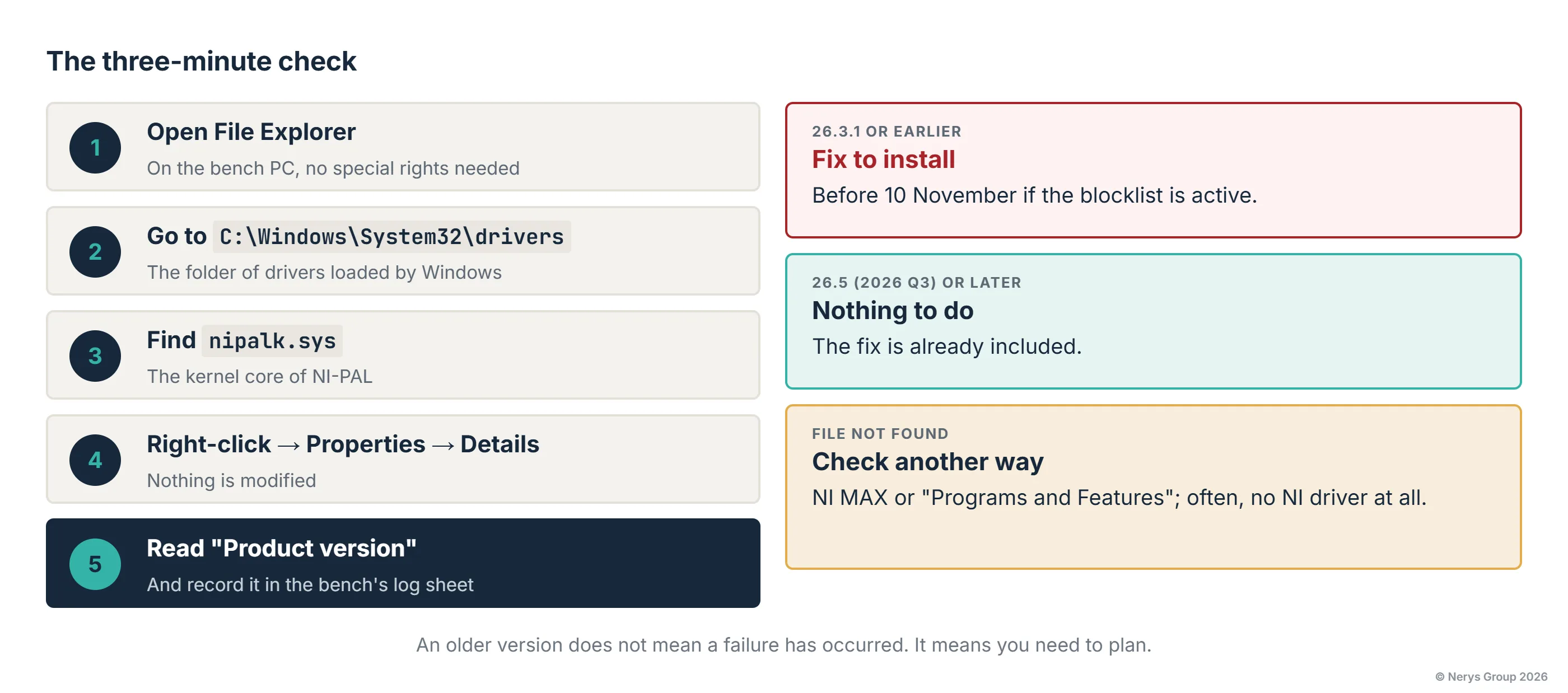
It requires no special rights and makes no change to the installation. On the bench PC, open File Explorer, go to C:\Windows\System32\drivers, find the file nipalk.sys, right-click, Properties, Details tab, and read the "Product version" field.
Three cases. Version 26.3.1 or earlier: the fix needs to be installed. Version 26.5 (NI-PAL 2026 Q3) or later: the fix is already included, nothing to do. File not found: either the PC has no NI drivers, or NI-PAL is installed differently; if in doubt, NI MAX or the "Programs and Features" panel will tell you. Note: an older version does not mean that something has gone wrong. It means you need to plan.
We recommend doing this check on every PC connected to NI hardware, including those whose bench has been "on hold" for a year; they are the ones that get restarted on the day they are needed, and reveal the failure at that very moment.
A targeted update, and what it does not change
The good news is that NI delivers a fix for NI-PAL alone, not a full driver update. In compatible configurations, you do not need to change your version of LabVIEW, TestStand or DAQmx, nor touch the application code. NI states backward compatibility down to NI-PAL 17.0. Installation takes around one minute and requires a restart; it is done through NI Update Service or with the installer downloaded from the NI website.
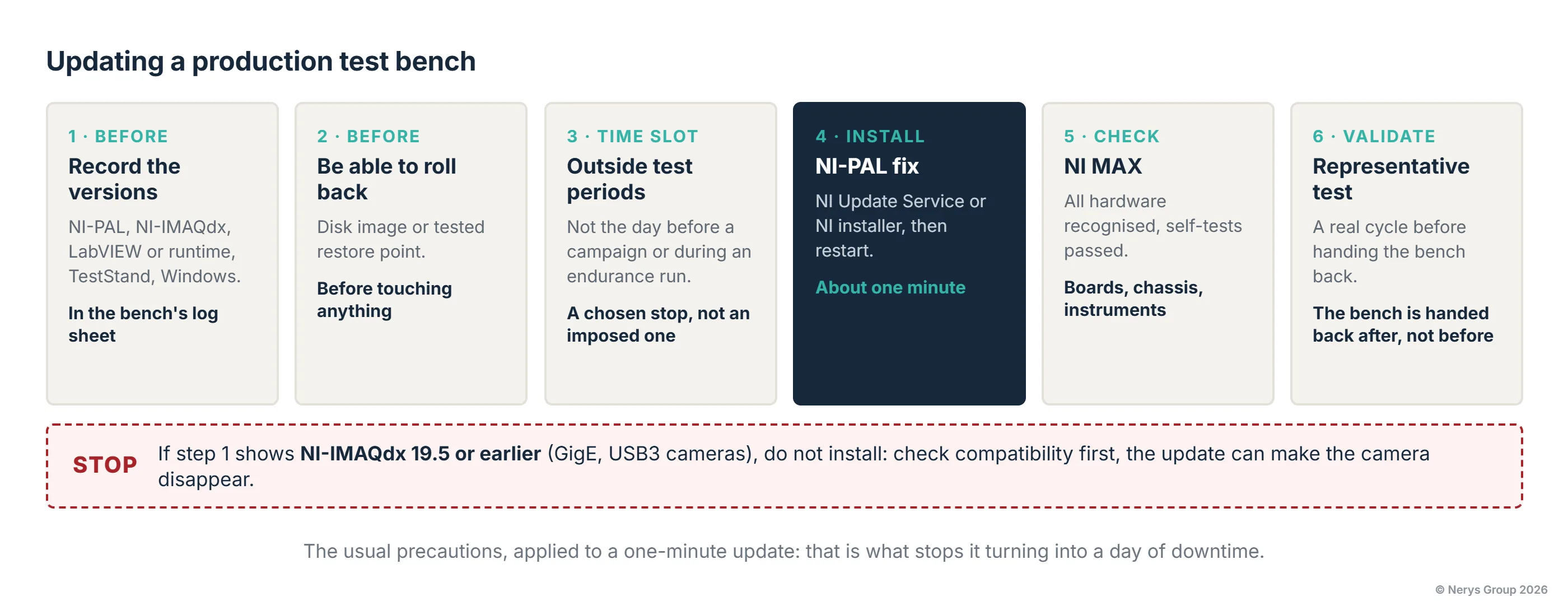
On an office PC, it takes as long as a coffee. On a production test bench, we apply the same rule as for any change to the software environment: record the installed versions beforehand, have a way to roll back (disk image or restore point), work outside test periods, restart, check that all hardware is recognised in NI MAX, then run a representative test before handing the bench back. This is not paranoia; it is what ensures that a one-minute update stays a one-minute update, and not a day of downtime.
The camera trap
There is one exception, and it concerns benches we know well. NI has identified an incompatibility between NI-PAL 2026 Q3 and older versions of NI-IMAQdx, 19.5 and earlier. On a visual inspection bench that relies on a GigE or USB3 camera and a 2019 IMAQdx, applying the fix without prior analysis can make the camera disappear instead of the board. This is nothing exotic: a PC still on LabVIEW 2019 is very likely to have drivers of the same generation. It is the typical case where the "compatible" update is not, and where you need to look at the whole installation before clicking.
More generally, every older bench has one or two of these dependencies you need to know about before touching it: a third-party board driver, a Windows version frozen for a long-forgotten reason, a communication component with no recent equivalent. Listing them once, and keeping the list up to date, is what we call knowing your test bench.
Key takeaways
A test bench is more than its application and its boards. Between the two sits a stack of technical components, inconspicuous but essential, which also need maintaining. NI-PAL is an ordinary example: a security fix, a Windows blocklist, and a date. Three minutes of checking per PC tell you who is affected, and a one-minute update, surrounded by the usual precautions, settles the matter, except on benches with older cameras, where you need to analyse before acting.
Nothing revolutionary. But we would rather write it now than take the call on Monday 16 November.
If you would like an inventory of your affected PCs, or a hand planning the update on a production test bench: web@nerysgroup.com.
Not sure how many of your PCs are affected?
We can carry out the inventory with you, then plan and validate the update bench by bench.
Sources: Mesulog, NI-PAL: a security update to plan for on your test benches and measurement systems; NI, Required NI-PAL Security Update; NI, security advisory CVE-2026-18485; NI, NI-IMAQdx 19.5 and earlier incompatible with NI-PAL 2026 Q3; Microsoft, Microsoft recommended driver block rules; NIST, NVD entry CVE-2026-18485. Information as of 23 October 2026; NI's instructions take precedence and may change.


